Prikazani su postovi s oznakom TUTORIAL. Prikaži sve postove
Prikazani su postovi s oznakom TUTORIAL. Prikaži sve postove
ponedjeljak, 28. svibnja 2012.

petak, 25. svibnja 2012.
How to reset/recover the ROOT password in openSUSE
Don’t have to mention the panic that kicks in when you have forgot or misplaced your root user password. Like most other operating systems, openSUSE helps you to recover or reset the root password from the console.
1. Boot the system and select the normal boot menu from the list. Once selected, in the “Boot Options” box type

This will launch you straight into a Bash shell prompt which comes up even before the Single User mode loads and has the “/” root file system mounted.
Please try the following to reset/recover root password. This should work on openSUSE 11.0 & openSUSE 10.x (tested on openSUSE 10.3):
1. Boot the system and select the normal boot menu from the list. Once selected, in the “Boot Options” box type
“init=/bin/bash” if you are using GRUB Boot loader
“linux init=/bin/bash” if you are using LILO Boot Loader
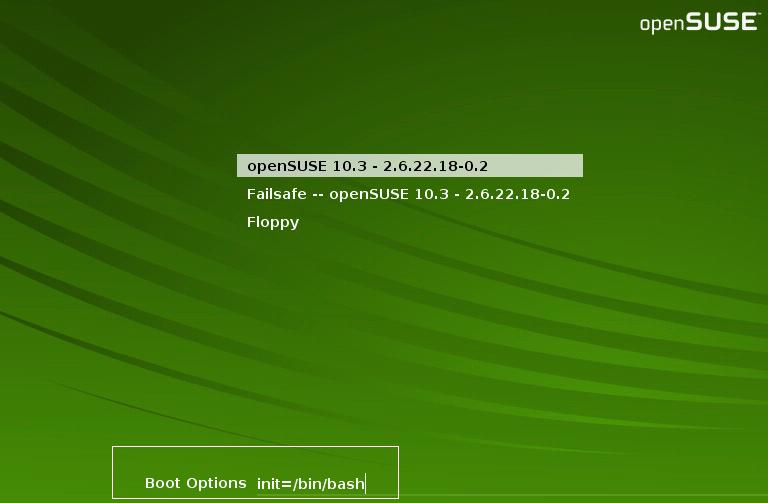
This will launch you straight into a Bash shell prompt which comes up even before the Single User mode loads and has the “/” root file system mounted.
Do a mount command to check if the root file system “/” is mounted as Read-Write. In my system, it indeed mounted as Read-Write.
opensuse11:~ # mount
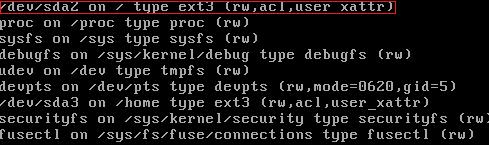
Else, you may need to remount the “/” file system with read-write as follows:
opensuse11:~ # mount -o remount,rw /
Now, simply type the passwd command and enter a new password:
opensuse11:~ # passwdChanging password for root
New Password:
Reenter New Password:
Password changed
Reboot the system and you are back in business.
opensuse11:~ # reboot
This should help!
Pretplati se na:
Postovi (Atom)